 Weeklo
Time Block Planning: A Weekly Method + Free Template
Time block planning in 6 steps: plan your week in blocks, see a worked example, and download a free weekly time blocking template PDF in A4 or US Letter.
Key takeaways
- Time block planning means giving each task a slot in your calendar instead of keeping it on an open-ended list.
- Plan the week in big blocks (2–4 per day), then adjust each morning.
- Order: non-negotiables → recurring blocks → deep work → admin batches → buffers.
- Leave buffer time every day and re-block when the day changes; a moved block is normal.
- Free weekly time blocking template below: A4 and US Letter, Nov–Dec 2026 and 2027.
In this article
Time block planning means giving every task a slot on your calendar instead of leaving it on a list, so each hour of the day already has a job. The weekly version works best: once a week, place two to four big blocks on each day, leave buffers, and adjust each morning. Below you’ll find the six steps, a worked example week and a free weekly time blocking template to print.
What is time blocking?
A to-do list tells you what to do. A time-blocked plan also says when. You divide the day into blocks (for example 9:00–11:00 deep work, 11:00–12:00 email) and each block has one kind of work.
Writer and computer science professor Cal Newport has written about the method for years. In his post on planning every minute of your work day he describes blocking the day on paper and making a new schedule when things change. Stanford’s Center for Teaching and Learning teaches a weekly time blocking method to students along the same lines.
A few related techniques you’ll see mentioned:
- Task batching: grouping similar small tasks (calls, email, errands) into one block.
- Day theming: giving each day a theme, such as Monday for admin and Tuesday for writing.
- Timeboxing: a hard time limit for a single task.
How to time block your week in 6 steps
Set aside 20–30 minutes on Friday afternoon or Sunday evening. Work in this order, because each step fills the space left by the one before.
- Block the non-negotiables. Sleep, meals, school runs, prayer or exercise times, anything you won’t move. Stanford’s guide also starts by blocking these basics.
- Add fixed appointments. Meetings, classes, calls with set times.
- Add recurring blocks. The same block every week: email at 11:00, weekly review on Friday morning, gym after work.
- Place deep-work blocks. Your hardest, most important work goes into 90–120 minute blocks at the time of day you focus best. Two or three per week are enough to start.
- Batch the small stuff. Errands, admin, short replies: one or two blocks per day, not scattered across it.
- Leave buffers and plan the review. Keep at least an hour a day unblocked, and finish the week with a 30-minute block to review and plan the next one.
Each morning, look at the day’s blocks for two minutes. If something changed, re-block the rest of the day. Moving a block is part of the method.

Example: a time-blocked work week
Here’s a realistic week for someone with an office job. Mornings start with a short planning block, four days have a 9–11 deep-work block, and email is batched into one hour.
| Time | Mon | Tue | Wed | Thu | Fri |
|---|---|---|---|---|---|
| 8:30 | Plan the day | Plan the day | Plan the day | Plan the day | Plan the day |
| 9–11 | Deep work | Deep work | Deep work | Deep work | 9–10 Weekly review |
| 11–12 | |||||
| 12–13 | Lunch | Lunch | Lunch | Lunch | Lunch |
| Afternoon | 14–15 Team sync | 13–14 Client calls | 15–17 Admin | 14–15 Client pitch | 16–17 Plan next week |
| Evening | 17:30 Gym | – | 17:30 Gym | – | – |
The blocks don’t cover every hour. The gaps in the afternoon are buffers for the meeting that runs over, the urgent request, or a walk.

Free weekly time blocking template (PDF)
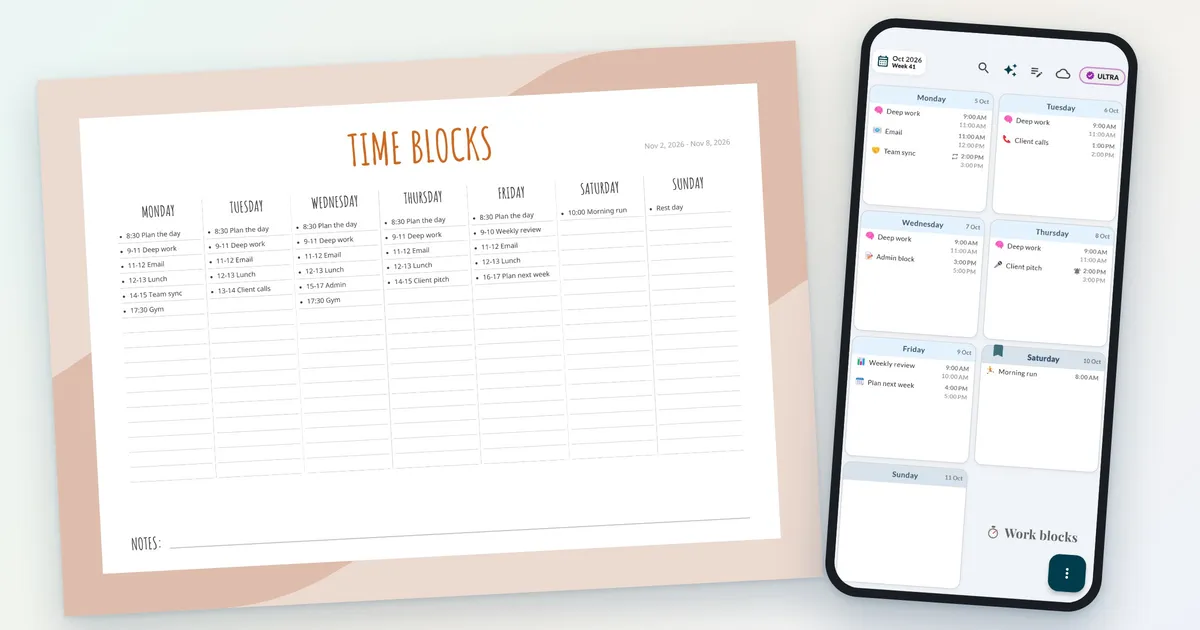
The template is the Weeklo “Weekly Vertical” layout: a lined column for every day of the week. Use one line per hour of your working day, or write each block on its own line with its time range, as in the example below. The dates are already printed, Monday to Sunday.

| File | A4 | US Letter |
|---|---|---|
| One-week sample (2–8 Nov 2026) | Download PDF | Download PDF |
| Nov–Dec 2026 (9 weeks) | Download PDF | Download PDF |
| 2027 (53 weeks) | Download PDF | Download PDF |
Free for personal use, no email required. The Weeklo app’s PDF export (PRO) produces A4; the US Letter files are made by us with the same template.

How to use it:
- Write the time range first (“9–11 Deep work”), so a glance down the column shows the day’s shape.
- Use a pencil. Blocks move; erasing beats crossing out.
- Highlight deep-work blocks in one colour so you can see at a glance whether the week has enough of them.
- Keep the notes line for the one thing you must finish this week.
Prefer a different look? The same dates are available in five more designs in our printable weekly planner collection.
Time blocking in a weekly planner app
Paper works, but a moved meeting means rewriting the afternoon. In a planner app you drag the block to another day instead. In Weeklo:
- Give each block a start and end time (PRO). Weeklo shows the times next to the task and sorts every day by start time, so your week grid reads like a schedule.
- Add reminders so your phone tells you when a block starts (PRO).
- Make blocks that repeat every week, like email or the Friday review, recurring tasks (PRO).
- Drag a block to another day when plans change (free).
Does time blocking work? Common mistakes
Time blocking fails in predictable ways:
- Blocking every minute. One late meeting knocks over the whole day. Plan fewer, bigger blocks.
- No buffer. Tasks take longer than planned; the planning fallacy is a well-documented bias. Leave unblocked time every day.
- Not re-blocking. When the plan breaks, make a new plan for the rest of the day instead of dropping it.
- Deep work at the wrong time. If you’re sharpest at 8:00, don’t spend that hour on email.
- Forgetting the weekly review. Without it, next week repeats this week’s mistakes.
Time blocking can also work with ADHD when the blocks are loose and visible; our guide to ADHD and planning has a lighter version. Blocking time for revision? See the worked weeks in our study schedule for exams. For the full weekly routine around your blocks, see how to plan your week, and if you’d rather see the week in rows than columns, try the week at a glance template.
Frequently asked questions
What is time blocking?
Time blocking is a planning method where you divide your day into blocks of time and give each block one job, such as deep work, email or errands. Instead of asking "what next?" all day, you follow the plan you made in advance and adjust it when things change.
How do you time block your week?
Start with fixed commitments like meetings and classes, then add recurring blocks such as workouts and email. Place your most demanding work in the hours you focus best, batch small tasks into one or two admin blocks, and leave buffer time every day. A weekly session of 20–30 minutes is enough.
Does time blocking actually work?
It works best when the blocks are realistic and you treat the plan as a draft. A common reason people give up is that they filled every minute and dropped the schedule at the first interruption. Fewer, bigger blocks with buffers survive a normal week much better.
What is the difference between time blocking and timeboxing?
Time blocking reserves time on your calendar for a type of work. Timeboxing sets a fixed limit for one task, for example 45 minutes to draft a report, and you stop when the time is up. Many people use both: a block for writing, with timeboxed tasks inside it.
Is there a free time blocking template PDF?
Yes. This page has a free weekly time blocking template with a lined column for each day, in A4 and US Letter, dated for November–December 2026 and for 2027. No email needed.