 Weeklo
Visual Planner: How to Plan Your Week in Pictures
What a visual planner is and how to set one up: a week grid, colours, icons and white space, with example weeks for home, meals, work and kids.
Key takeaways
- A visual planner shows your week as a picture: all days side by side, with colours and icons instead of long lists.
- Five building blocks: week grid, one colour per life area, one icon per task type, a highlighted priority, visible white space.
- Keep each day to 3–5 items, or the picture turns back into a wall of text.
- Works on paper (colourful printables), on a whiteboard, or in an app with drag & drop and emojis.
In this article
A visual planner shows your week as a picture instead of a list: all seven days side by side, colour for each area of life, an icon for each kind of task, and enough white space that busy days stand out. You can read it at a glance instead of working through a list. Below are the five building blocks, a step-by-step setup and example weeks for home, meals, work and kids.
What makes a planner visual
Any planner can be visual if it uses these five things:
- A week grid. All seven days on one page or screen, so you see the shape of the week before the details.
- One colour per life area. Work in blue, home in green, family in orange. A day full of blue is a work-heavy day; you know it without reading.
- One icon per task type. A 🛒 for shopping, 🦷 for the dentist, 📞 for calls. An icon is quicker to spot than a word when you scan the page.
- A highlighted priority. One task per day stands out, with bold text, a marker or a star.
- Visible white space. Empty space on a day tells you where the flexible tasks can go.
Project tools like Gantt charts and kanban boards are also called visual planning, but they’re built for team projects. For a personal week, the five building blocks above are enough.
How to set up a visual weekly planner
You can do this on paper or in an app; the steps are the same.
- Start with a week grid. A printable with seven boxes, a whiteboard with seven columns, or a planner app with a week view.
- Choose 3–4 colours, not more. One per life area you actually juggle (for example work, home, kids, health). Write the key somewhere visible.
- Pick icons for your repeating tasks. Gym 💪, groceries 🛒, laundry 🧺, bills 💡, calls 📞. Reuse the same icon every week so it becomes automatic.
- Cap each day at 3–5 items. More than that and the picture turns back into a list.
- Mark one priority per day. If everything is highlighted, nothing is.
- Look at it every morning. A visual planner works because it’s quick to read, so make reading it a two-second habit.

Visual planner examples
A family or home week
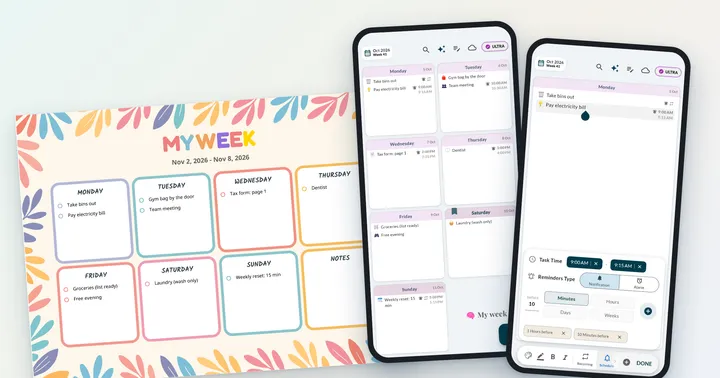
Appointments, chores and birthdays for the household. Icons do most of the work: a 🎂 on Thursday tells everyone there’s a birthday, and the 🎁 on the same day is the reminder to wrap the present. The example above is a typical home week.
A visual meal planner
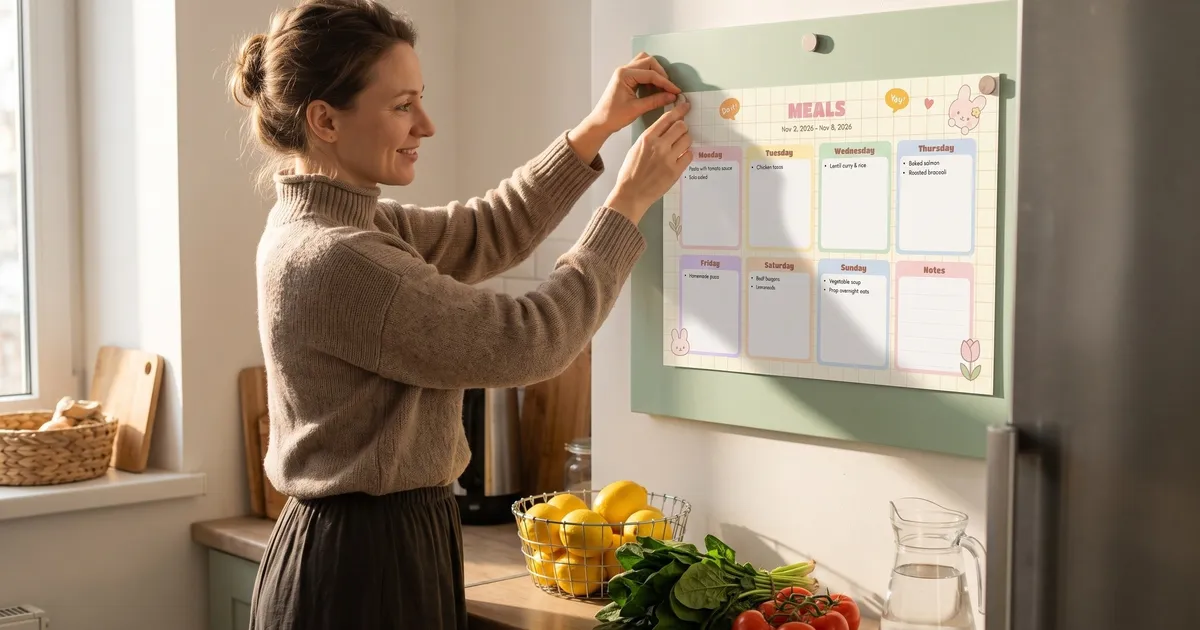
Meals suit visual planning well because food emojis are easy to recognise. Write one dinner per day with its emoji, and you’ll see at a glance whether the week has enough variety (three pasta nights in a row stand out immediately).

If you prefer paper, print the week in a colourful template and hang it on the fridge. Everyone in the family can see what’s for dinner without asking. Our weekly meal plan printable has a dinner grid and a matching grocery list.


A work week, kept separate
When work and home tasks share one page, both get noisy. Two separate visual planners, each with its own colour, keep the picture clean: open the work one at your desk, the home one in the evening.

A visual day planner for kids
Children who can’t read yet, or don’t like reading lists, can follow a picture schedule. Keep it to a few steps with one clear icon each: 🎒 pack the bag, 📚 homework, 🎹 piano, 📖 reading. For a younger child, print it big and stick it at their eye level. Older kids can manage their own week in a planner of their own.

Paper or app: visual planner options
| Colourful printable | Whiteboard | Weeklo app | |
|---|---|---|---|
| Whole week at once | ✓ | ✓ | ✓ week grid |
| Icons | Draw or use stickers | Draw | Emojis; AI emojis added automatically (PRO) |
| Colours per area | Coloured pens | Coloured markers | A colour per planner; multiple planners (PRO) |
| Moving tasks | Rewrite | Wipe and rewrite | Drag & drop |
| Print the week | – | – | PDF export, A4 (PRO) |
| Cost | Free | Board + markers | Free to start |
Our free printable weekly planner includes two colourful designs (Bloom and Pastel Wonder) that work well as visual planners, and the week at a glance template is the simplest grid if you want to add your own colours.
Who a visual planner helps most
- Visual thinkers who remember pictures and colours better than text.
- Busy households, because a fridge planner with icons can be read by everyone, kids included.
- People with ADHD or anyone who finds walls of text tiring. ADHD specialists such as psychologist Ari Tuckman, in ADDitude, recommend making time and tasks visible with calendars, timers and reminders. Our guide to ADHD and planning builds a whole weekly system around that idea, and our comparison of the best planners for ADHD adults shows where a visual week fits next to paper pads and task apps.
- Anyone who abandoned a planner because opening it felt like work. A week you can read quickly is easier to keep checking.
For the full weekly routine (brain dump, priorities, buffers), see how to plan your week.
Frequently asked questions
What is a visual planner?
A visual planner is a planner that lets you understand your plans by looking rather than reading. It usually shows a whole week at once and uses colours, icons or pictures, and spacing, so you can tell in a few seconds which days are busy and what kind of tasks are on them.
Is a visual planner good for ADHD?
Many people with ADHD find visual planners easier to keep up, because the plan stays in sight and colours and icons are quicker to scan than text. ADHD specialists often recommend making time and tasks visible with calendars, timers and reminders. It is a planning aid, not a treatment.
What is a visual meal planner?
A visual meal planner shows the week's meals on a grid with a picture or emoji for each dish, often with the shopping list next to it. At a glance you can see whether the week has variety, which nights need prep and what to buy.
How do I make a visual day planner for kids?
Use a few big, picture-based steps: an icon or emoji for each activity (school bag, lunch, homework, bath, bed), in the order they happen. Keep it to five to eight steps, print it large, and put it at the child's eye level so they can follow it on their own.
Is there a free visual planner app?
Weeklo is free to start: the free plan has the weekly grid, drag & drop and unlimited tasks. The app runs on web, iPhone and Android (syncing across devices is part of ULTRA). Automatic AI emojis, multiple planners and PDF export are part of PRO.